
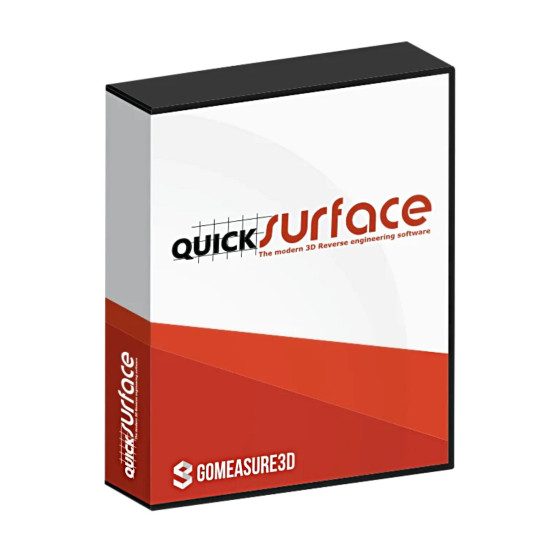
-550x550.jpg "Software for 3D scanner QuickSurface Lite")

-80x80.jpg "Software for 3D scanner QuickSurface Lite")
- Stock: In Stock
- Product code: QuickSurface Lite
- Weight Brutto: 0.50kg

More from this brand

-60x60w.jpg "3D scanner Artec Leo")

-60x60.jpg "3D scanner Artec RAY II")
Software for 3D scanner QuickSurface Lite: an easy start in the world of reverse engineering
Software for 3D scanner QuickSurface Lite is the perfect software solution for those just starting to learn the basics of reverse engineering. Representing a light version of the well-known QUICKSURFACE Pro, this program has an intuitive interface and includes all the necessary tools for efficient processing of three-dimensional scans. If you are looking for 3D scanner software QuickSurface Lite, the price of which will be acceptable, and the functionality sufficient for the first steps, then this is the best choice.
Key features of QuickSurface Lite for 3D scan processing
The QuickSurface Lite 3D scan processing program offers a diverse set of functions that will help you easily edit and prepare your 3D models for further work. You will be able to:
- Easily clean meshes from unwanted artifacts.
- Align them relative to the global coordinate system.
- Extract key geometric elements necessary for subsequent modeling.
.jpg)
Advantages of using QuickSurface Lite:
- A worthy alternative to Geomagic Design X Lite
- QuickSurface Lite – a powerful set of tools at an attractive price
- Simple and intuitive interface
- Affordable reverse engineering process
- Software for beginners.
- Will help to quickly and efficiently process three-dimensional scans
- Will allow you to extract the necessary geometric information
- Export the obtained results in widely used CAD/CAM formats IGES and STEP for subsequent integration into your workflow.
QuickSurface Lite features (license) for 1 year or perpetual option
Automatic creation of basic surfaces
This function allows you to quickly generate surfaces on objects with complex organic geometry with just one mouse click. The program automatically creates high-quality surfaces with G2 continuity (tangent continuity) over almost the entire area and G1 continuity (positional continuity) in rare, special points, minimizing the need for manual user intervention.
-0.jpg)
Three-dimensional sketching
Draw free-form curves directly on the reference surface of a 3D scan. Create smooth transition curves that will become the basis for building fill surfaces, arbitrary three-dimensional shapes, or for use in other CAD system operations related to surface creation.
Creating 2D sections in QuickSurface Lite:
The interactive section tool allows the user to obtain reference points for creating 2D sketches. Align the section plane relative to extracted primitives, CAD model faces, or create sections manually by interacting with the screen. For lofting tasks, the possibility of simultaneous formation of several sections is provided.
Global accurate scan alignment
This function optimizes the process of combining two or more partially overlapping scans of the same object. The intelligent global accurate alignment algorithm allows you to form a complete three-dimensional model from multiple scans obtained from different angles.
Alignment by specified points
Combine several sets of scan data with each other or align scan data relative to an imported CAD model. To perform accurate alignment, it is sufficient to specify three or more corresponding points on different objects.
Object alignment in space
Place the scanned object in the global coordinate system using the extracted geometric primitives. Interactive coordinate system definition provides the user with the ability to precisely adjust the orientation of the model in three-dimensional space.
.jpg)
Surface approximation in QuickSurface Lite
Select the area of interest on the scan surface, and the software will automatically perform its approximation with a smooth surface of arbitrary shape. The resulting surface is automatically expanded to facilitate subsequent trimming. The built-in real-time deviation color map visualizes the quality of the created surface.
Determination of the plane of symmetry
Define the plane of symmetry of the object and use the built-in analyzer to assess the accuracy of its position. On-screen controls allow you to precisely adjust the position of the plane to achieve optimal results.
-0.jpg)
Extraction of geometric primitives
Quickly extract basic geometric shapes such as planes, cylinders, cones, and spheres. In addition, create auxiliary geometric elements – lines and points – which can be used when aligning meshes relative to the global coordinate system or other scans.
Removal of unwanted elements (de-featuring)
Using QuickSurface Lite capabilities, you can easily remove artifacts such as stamps, markers, and other similar elements from the scan surface. To remove an element, simply select it and press the corresponding button.
Polygon mesh editing
Intuitive mesh editing tools allow you to effectively reduce data size without loss of accuracy, fill gaps, and remove random outliers. Prepare a watertight polygon mesh fully ready for 3D printing or further reverse engineering.
.jpg)
QuickSurface Lite: simple import of scan data
QuickSurface Lite scan-based 3D modeling software provides compatibility with 3D scanners from any manufacturer, supporting data import in STL, OBJ, or PLY formats. For long-range scanners, the ability to import data in PTX format is provided. The program allows the user to load polygon meshes of any size.
If you are interested in purchasing QuickSurface Lite and evaluating all the advantages of modern software for processing three-dimensional scans, please contact our qualified specialists. We will provide you with detailed advice, help you choose the best license option, and answer all your questions regarding the price, functionality, and practical application of QuickSurface Lite 3D scanner software.
Choose QuickSurface Lite 3D scanner software. A simple, functional program for processing 3D scans is available in Poland, call us!

-250x250.jpg "3D scanner Artec Eva")
-250x250w.jpg "3D scanner Artec Leo")
-250x250.jpg "3D scanner Artec Leo")
-250x250.jpg "3D scanner Artec RAY II")
-250x250.jpg "3D scanner Artec RAY II")

(1)-250x250.jpg "3D scanner Artec Spider II")


-250x250.jpg "3D scanner Artec Point")
-250x250.jpg "3D scanner Artec Point")










-250x250.jpg "Software for 3D scanner QuickSurface Lite")